Introduction
Preview deployments are often touted as a major selling point of PaaS platforms like Vercel and Netlify — and for good reason. They automatically deploy every pull request to a unique, accessible URL before merging, enabling reviewers to test changes in a production-like environment without local setup.
But here’s the thing: with modern AI tools like Claude Code and GitHub Actions, setting up your own preview deployment system is no longer the daunting task it once was. My only manual step was installing the DigitalOcean command-line tool (doctl) — after that, Claude Code did almost all of the setup: writing the GitHub Actions workflows, the deploy and cleanup scripts, the Traefik configuration, and the Dockerfile. I managed to get a fully working setup in just 4 hours. This guide walks through exactly how to build a robust preview deployment system using GitHub Actions, Docker, and a reverse proxy.
Core Architecture
The Three-Layer Stack
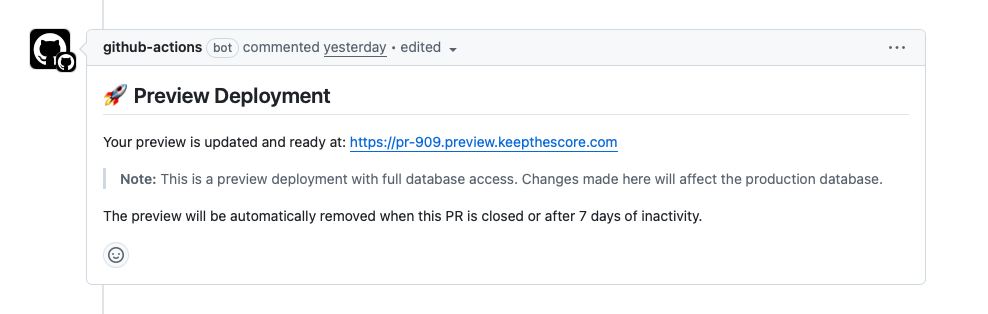
1. GitHub Actions Workflow The workflow triggers on PR events (open, update, close) and orchestrates the entire deployment pipeline. It builds Docker images, pushes them to the DigitalOcean Container Registry, and triggers deployment scripts via SSH. Once deployed, it posts a comment on the PR with the preview URLs so reviewers can click straight through.
2. Containerized Application Each PR runs in its own Docker container with defined resource limits. In my case each container is a multi-service setup: Supervisor manages Nginx, Gunicorn (3 workers, 2 threads), and Memcached inside a single container. This mirrors the production stack so the preview is a faithful replica. Resource limits ensure isolation and prevent exhaustion from runaway processes.
3. Reverse Proxy with SSL
A reverse proxy handles routing requests to the correct container based on subdomain, while automatically managing SSL certificates via Let’s Encrypt. I use Traefik for this because of its excellent Docker integration. In my setup each container gets 3 Traefik routers — one for each domain the app serves (keepthescore.com, leaderboarded.com, and scorejudge.com) — so reviewers can test all branded entry points.
Implementation Steps
Step 1: Infrastructure Setup
Provision a dedicated server with Docker installed. I use a DigitalOcean droplet in Frankfurt (4GB RAM, 2 vCPUs, ~$30–40/month). Create a wildcard DNS record pointing *.preview.yourdomain.com to your server’s IP address. This enables infinite subdomains without manual DNS configuration.
Step 2: Reverse Proxy Configuration
Deploy a reverse proxy that can dynamically route based on Docker container labels. Traefik excels at this with its Docker provider, automatically discovering containers and configuring routes based on labels:
# Example Traefik labels for a container
labels:
  - "traefik.enable=true"
  - "traefik.http.routers.pr-123.rule=Host(`pr-123.preview.yourdomain.com`)"
  - "traefik.http.routers.pr-123.tls.certresolver=letsencrypt"
Step 3: GitHub Actions Workflow
Create a workflow that builds and deploys on PR events. Key considerations:
- Build caching: Use Docker layer caching and GitHub Actions cache to speed up builds
- Registry authentication: Store registry credentials as GitHub secrets
- SSH deployment: Use SSH keys stored in secrets for secure server access
- Conditional execution: Deploy on open/update, cleanup on close
Step 4: Deployment Scripts
Write idempotent deployment scripts that handle:
- Container lifecycle: Stop and remove existing containers before deploying
- Environment configuration: Pass PR-specific environment variables
- Resource limits: Enforce memory and CPU constraints
- Health checks: Verify the deployment is accessible before reporting success, including SSL certificate verification
Step 5: Automated Cleanup
Implement two cleanup mechanisms:
- Immediate: Remove containers when PRs are closed
- Scheduled: A cron job running daily at 2 AM removes preview containers older than 7 days and prunes unused Docker resources (images, volumes, networks)
Critical Pitfalls and Solutions
Pitfall 1: Production Database Access
The Issue: My preview deployments connect directly to the production database with full read/write access. While this provides the most realistic testing possible, it creates significant risks:
- Test data polluting production
- Accidental data deletion or corruption
- Security exposure if preview containers are compromised
The Solution: Use one of these approaches:
- Database branching: Create isolated database copies for each PR
- Read-only access: Grant only SELECT permissions to preview deployments
- Staging database: Use a separate database that mirrors production structure
- Database proxy: Implement a proxy layer that filters dangerous operations
Pitfall 2: Secret Management
The Issue: Hardcoding secrets or committing SSH keys to the repository creates security vulnerabilities.
The Solution:
- Store all secrets in GitHub Secrets or a secret management system
- Use environment variable injection at runtime
- Rotate secrets regularly
- Never log or echo secret values in scripts
Pitfall 3: Resource Exhaustion
The Issue: Without limits, a single PR with a memory leak or infinite loop can crash the entire preview server.
The Solution:
- Set hard memory limits:
--memory="1g" - Set CPU limits:
--cpus="1" - Implement container restart policies:
--restart=unless-stopped - Monitor resource usage and alert on anomalies
Pitfall 4: DNS and SSL Certificate Limits
The Issue: Let’s Encrypt has rate limits (50 certificates per registered domain per week). With many PRs, you can hit these limits.
The Solution:
- Use wildcard certificates: One certificate for
*.preview.yourdomain.com - Implement certificate caching and reuse
- Consider using staging certificates for development
- Monitor certificate issuance rates
Pitfall 5: Docker Image Bloat
The Issue: Without cleanup, the Docker registry and server disk fill up with old images.
The Solution:
- Tag images with both PR number and commit SHA for traceability
- Implement registry garbage collection
- Prune unused images on the server:
docker image prune -a - Set registry retention policies
Pitfall 6: Incomplete Cleanup
The Issue: Failed deployments or network issues can leave orphaned containers running.
The Solution:
- Use unique, predictable container names:
pr-${PR_NUMBER} - Implement force removal in cleanup scripts:
docker rm -f - Add scheduled cleanup jobs that find and remove old containers
- Log all operations for debugging
Security Considerations
Network Isolation
Create a dedicated Docker network for preview containers. This prevents containers from accessing the host network or each other unnecessarily.
Authentication
Consider adding basic authentication to preview deployments:
- Prevents search engine indexing
- Limits access to team members
- Protects sensitive features under development
Monitoring
Implement logging and monitoring:
- Container logs: Centralize and retain for debugging
- Access logs: Track who accesses preview deployments
- Resource metrics: Monitor CPU, memory, and disk usage
- Alerting: Notify on deployment failures or resource issues
Performance Optimizations
Build Speed
- Multi-stage builds: Separate build and runtime stages
- Layer caching: Order Dockerfile commands from least to most frequently changing
- Registry caching: Push and pull cache layers from the registry
Deployment Speed
- Pre-pull base images: Keep common base images on the server
- Health check optimization: Use lightweight health endpoints
Scaling Considerations
As your team grows, consider:
- Multiple preview servers: Load balance across servers
- Kubernetes: Use namespaces for isolation and better orchestration
- Serverless options: Deploy to platforms like Vercel or Netlify for frontend previews
- GitOps: Use tools like ArgoCD for declarative deployments
Conclusion
Preview deployments transform the code review process by providing instant, accessible environments for testing changes. While the implementation requires careful attention to security, resource management, and cleanup, the productivity gains justify the investment.
Key takeaways:
- Isolate everything: Use containers, networks, and resource limits
- Automate cleanup: Implement both immediate and scheduled cleanup
- Secure secrets: Never commit secrets; use environment variables
- Monitor actively: Log operations and track resource usage
- Plan for scale: Design with growth in mind
By following this guide and learning from the pitfalls identified in real implementations, you can build a robust preview deployment system that accelerates development while maintaining security and stability.
Thanks for reading this 100% hand-written post! Follow me on LinkedIn for more or check out my projects.